Japanese to English PDF translator

日本語EN

Open a Japanese PDF.
Follow it in English.

Translate Japanese manuals, reports, and scanned PDFs into English. Keep diagrams and instructions together, then use the bilingual copy to check numbers, model names, and the source wording.

Japanese text and scans OCR included Check the original
Languages are preselected. You can change them below.
Output
Your document is sent only when you click Translate PDF to English.

Real PDF comparison

A Japanese inspection guide, readable in English.

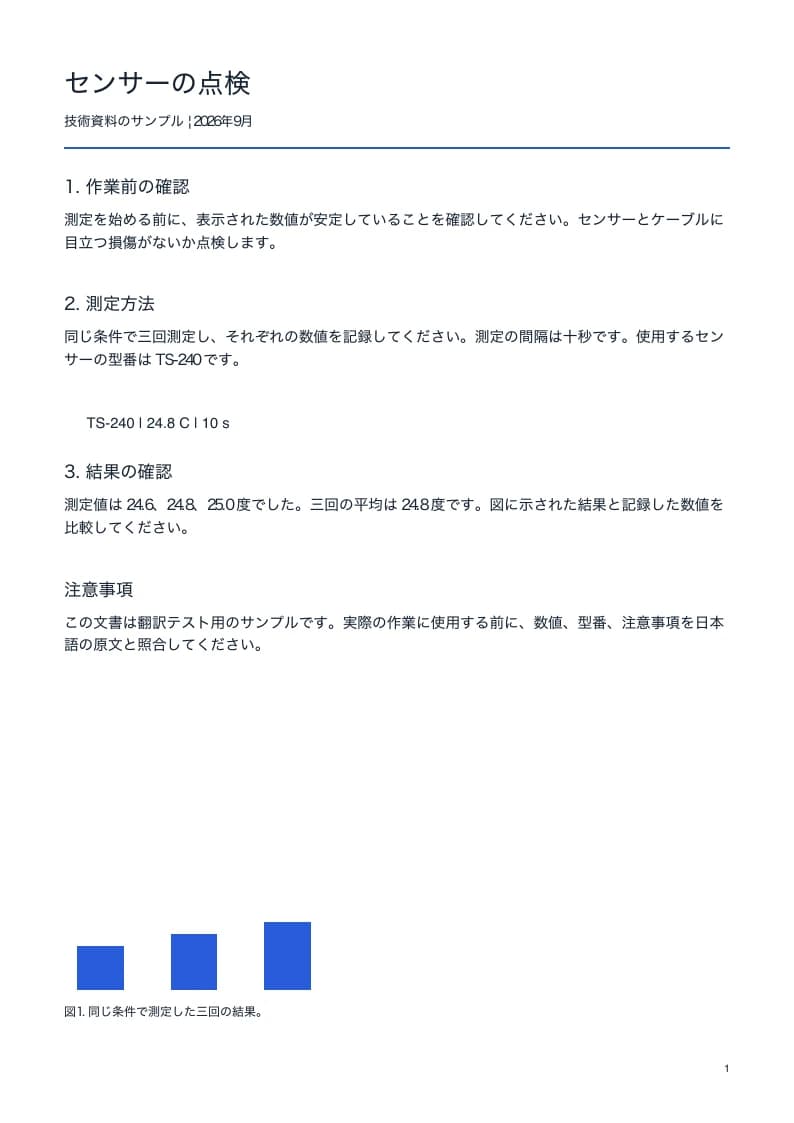
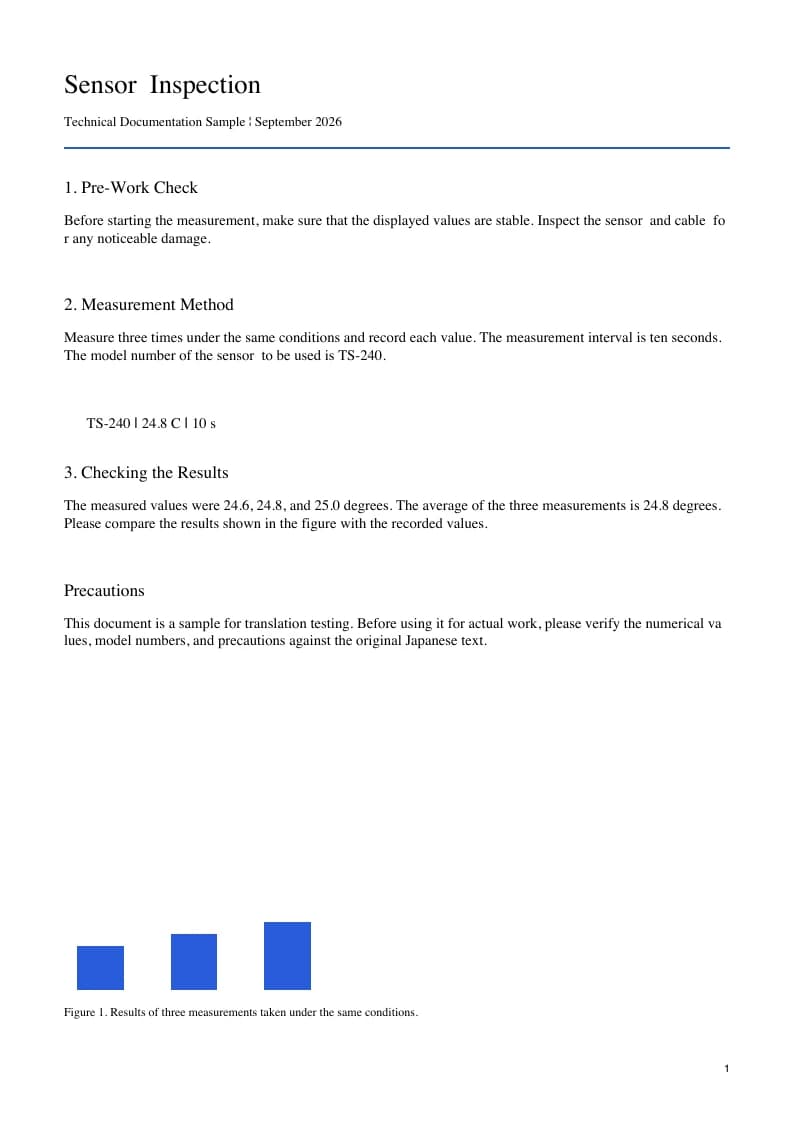
The original is a fictional Japanese temperature-sensor guide created for this demo. Its English counterpart is the actual, unedited translation worker output. Open both PDFs to check the numbered instructions, model identifier, measurements, and chart caption. The source uses horizontal Japanese text.

ACTUAL WORKER OUTPUT1 page · Synthetic source · September 2026
SOURCE DOCUMENTJapanese
Japanese sensor inspection guide with numbered instructions, model TS-240 and measurement chart
TRANSLATED DOCUMENTEnglish
Actual English translation of the Japanese sensor guide with instructions and numerical readings
What to compare
  • Kanji and kana translated in context
  • TS-240 and measurement values
  • English wrapping, including words split across lines

This is one completed translation, not a guarantee for every PDF. The sample source is fictional; inspect important details in your own document.

Fonts, text and layout

Make the Japanese instructions usable in English.

Japanese manuals often mix kanji, hiragana, katakana, Latin model identifiers, and compact diagrams. An English translation can need more space than the source text block. Inspect the result as a document: a translated warning belongs with the right component, and a number belongs with the same unit. The downloadable sample demonstrates one horizontal-text manual rather than every Japanese writing direction.

Horizontal and vertical text need different review

The sample on this page uses horizontal Japanese. Vertical writing, ruby annotations, tiny diagram labels, and dense multi-direction layouts are harder to reconstruct reliably. You can submit your PDF, but check the order of the resulting instructions and labels carefully. Do not infer support for a difficult writing direction from a clean horizontal-text example; test a representative page before a long document.

Separate source quality from translation quality

A text-based PDF usually gives the translator clearer input than a photograph of a printed manual. OCR is applied when pages are scanned. Blurred kanji, low contrast, stamps over text, and sideways pages can cause recognition mistakes before translation begins. Review source names and numerical details, and use the rotate tool if the PDF itself opens in the wrong orientation.

Preserve the meaning of instructions

Japanese instructions can omit a subject that must be inferred in English. Machine translation may choose wording that sounds clear but changes the intended action. Compare warnings, negative instructions, dates, and measurements against the Japanese original. A bilingual file makes that check easier by putting the same source page beside its English translation; technical terms should be reviewed by someone familiar with the document.
Choose your document

Read Japanese documentation with the source close by.

Equipment guides and technical manuals

Translate setup instructions, inspection procedures, and maintenance reports while keeping their diagrams in context. Model names and part codes should stay recognizable across languages. Extract just the relevant section of a long manual when you need a specific procedure; this also reduces the number of pages used by the task.

Scanned reports and reference material

A scanned Japanese document does not need selectable text before you upload it. OCR is part of translation, but the scan still needs to be readable. Use a representative page to inspect the outcome, especially for small text, handwritten additions, vertical passages, or characters printed across an image.

Ready when you are

Upload. Confirm. Read.

  1. 01

    Choose your Japanese PDF

    Upload a text-based or scanned PDF, or load the one-page sample in the form. Files can be up to 50 MB and 100 pages. The whole document must fit your remaining page allowance.

  2. 02

    Confirm Japanese → English

    The languages are selected for this page. You can change them or swap the direction. Keep Both versions for reading and comparison, or choose a single output. Start the translation when you are ready.

  3. 03

    Review and download

    Follow progress in the upload form. When processing finishes, download the translated or bilingual PDF and compare important wording and numbers with the source.

日本語の PDF を英語で読む

日本語のマニュアルや報告書をアップロードし、From が Japanese、To が English になっていることを確認してください。Both versions を選ぶと、英語の PDF と原文を並べた対訳 PDF をダウンロードできます。スキャン文書は OCR を使用します。数値、型番、注意事項を原文と照合してください。このサンプルは横書きです。

日本語の PDF を選ぶ

Before you translate

Questions about Japanese to English PDFs.

Can I translate a Japanese PDF with no selectable text?

Yes. Image-based PDFs enter the OCR translation workflow. The system first needs to recognize the page text, so scan quality affects the English output. Review faint characters, names, dates, and numbers against the original. If the document is sideways, rotate the affected pages before starting rather than relying on the translated preview to reveal the problem.

Does the sample prove that vertical Japanese will translate correctly?

No. The downloadable sample contains horizontal Japanese text. Vertical text, ruby, mixed reading directions, and manga-style speech layouts can produce different results. Start with a representative page and review reading order before translating a longer file. This page is designed around PDF manuals and reports, and it does not promise reliable reconstruction of every Japanese layout.

Can I keep Japanese and English together in one PDF?

Choose Bilingual or keep Both versions selected. The bilingual download pairs each Japanese source page with its English translation from left to right. It is useful for checking terminology and finding a figure in the same page context. The translated-only version is a separate reading copy; compare important instructions with the source before using them.

How can I translate just part of a long Japanese manual?

Use Extract PDF pages to create a new file containing the relevant section. Download it and upload that smaller PDF here with Japanese and English selected. Each translation task accepts up to 100 pages and 50 MB, and the entire file must fit your available page allowance. Extraction itself is performed in the browser.

Translation uses your normal page allowance. Compare plans and page limits. File handling is explained in our Privacy policy.

Choose a language pair

Another document, another language?

Open a translator with the languages selected. See a real PDF example before you upload.

Japanese → English

Start with your own PDF.

Choose a PDF